19/10/2026 12:26
Before the Showroom Visit: YouTube Image Posts for Cambodian Tile Shops

A tile photograph can attract attention while leaving the buyer unsure what to ask. Which sample is pictured? Is the surface suitable for the intended room? Can the shop show it beside another finish? For a Cambodian tile business, a useful YouTube image post should help someone prepare those questions before travelling to the showroom. This workflow connects a small set of product photographs to a clear enquiry process. It also gives SMM-panel customers a practical decision rule: identify the customer problem before considering any service. Purchased engagement cannot establish genuine interest, sales, ad delivery or a Cambodian audience. All shop scenarios and product codes below are hypothetical.
1. Choose a showroom question that pictures can answer
Start with one recurring uncertainty from actual customer conversations. A hypothetical Phnom Penh shop might hear, “Which of these two cream tiles should I come to see?” That question suits a short visual comparison. A different question, such as how a tile behaves during installation, may require a demonstration and qualified product guidance. Choose the format according to the information needed, rather than turning every topic into another image post.
Write a purpose statement before taking photographs: “Help viewers identify two samples and tell us which one they want to inspect.” This creates a practical boundary. The post does not need to contain the entire catalogue, settle technical suitability or promise stock. Its job is to make the next conversation more specific. Decide who will answer that conversation and what information they must check before inviting someone to visit.
2. Confirm that your channel can use posts
YouTube says posts can appear on the channel page and may appear in Home and Subscriptions feeds; image posts may also appear in the Shorts feed. Access depends on factors including channel role, and posts are unavailable for supervised accounts and channels set as Made for Kids. Check the actual channel before planning around this feature. These placements are possibilities, not promised distribution. [YouTube: Learn about posts](https://support.google.com/youtube/answer/9409631?hl=en)
Treat feature access as a preparation check, not a reason to change an accurate audience setting. If the necessary controls are unavailable, keep the comparison brief and photographs ready for an existing appropriate channel format. Do not assume buying followers will unlock a missing feature. For a Cambodian shop serving Khmer-speaking customers, prepare the customer-facing wording in the language those customers understand, with product codes preserved consistently.
3. Build a compact visual sequence
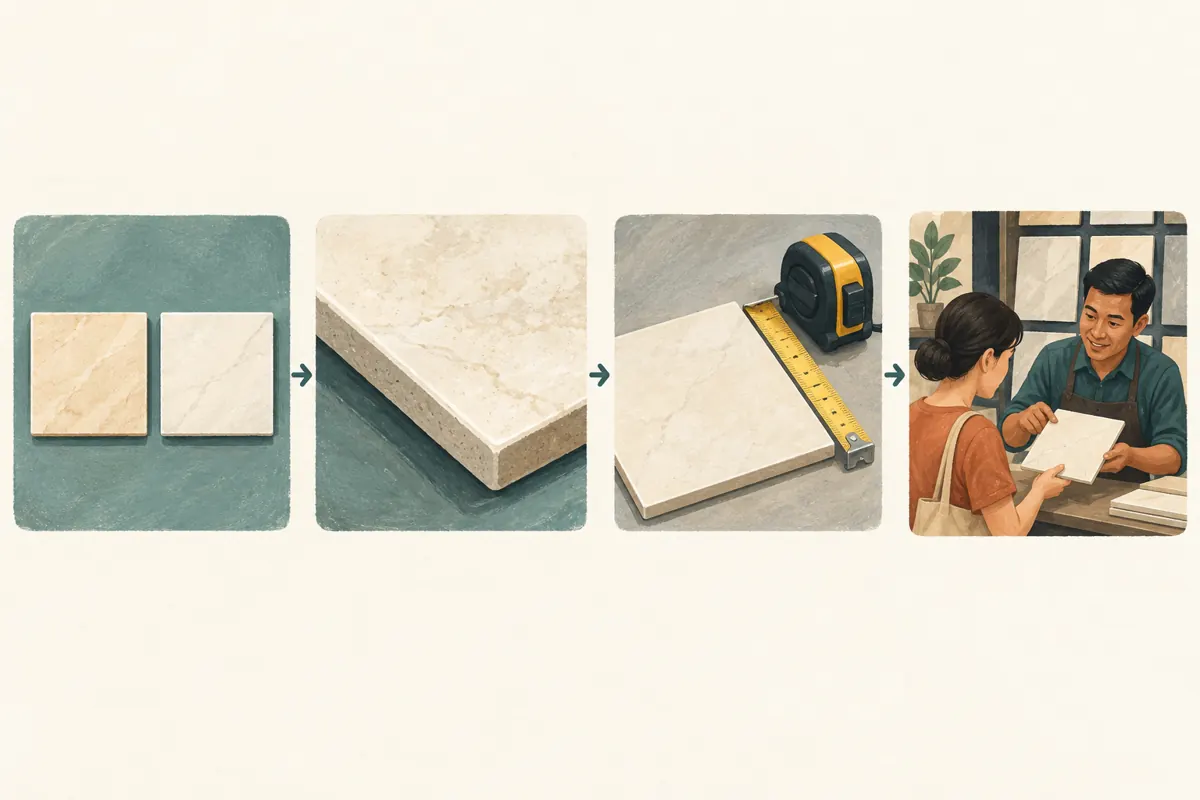
For the hypothetical comparison, plan four pictures. The opening image shows both samples together, with short identifiers such as Sample A and Sample B. The second gives a closer view of the surface and edge. The third communicates size using verified dimensions and a straightforward reference. The final picture shows what visitors can inspect at the showroom, accompanied by a clear invitation to check sample availability.
Each picture should answer a different question. Avoid filling the sequence with nearly identical angles simply because more upload slots are available. Keep the product identifiers attached to the correct sample throughout. A shopper who saves only one picture should still be able to identify it later. Put important qualifications in the accompanying text as well: an isolated image may lose the explanation that surrounded it in the original post.
4. Photograph both options under comparable conditions
Place the samples beside each other on a neutral surface and photograph them during the same session. Keep lighting, camera position and editing choices consistent. If one sample is photographed near a bright window and the other beneath a coloured lamp, the apparent difference may come from the setup. Remove distracting packaging, delivery notes and customer documents from the frame before shooting.
Compare the photographs against the physical samples before approval. Avoid edits that exaggerate warmth, gloss or texture to make one option more attractive. Explain that screen colour and lighting affect appearance and invite an in-person comparison where appropriate. A photograph also cannot establish slip resistance, durability or suitability for a wet area. Support those claims with the relevant product information. The illustrations accompanying this article explain the workflow; they are not evidence of any tile’s properties.
5. Write a caption that prepares an enquiry
Use a simple order: identify the comparison, explain what viewers can observe, state what still requires confirmation, and give one next step. A hypothetical caption could say: “Comparing Sample A and Sample B for your room? These photographs show their appearance under the same light. Tell us the sample code and intended room so we can check the relevant product information and whether a viewing sample is available.”
Separate appearance from availability. If you mention price, specify the currency and whether it applies per tile, box or square metre, using confirmed shop information. Do not imply that delivery, installation or accessories are included unless they are. For customers outside Phnom Penh, make the enquiry route clear before they arrange travel. Invite them to confirm a viewing appointment or sample availability without promising that a public comment reserves goods.
6. Assemble the post and inspect the result
On a computer, YouTube’s documented route is Create, then Create post, followed by the image option and accompanying message. Its guidance allows up to ten images, lists JPG, PNG, GIF and WEBP, and specifies a size limit of 16 MB. YouTube suggests square images for feed presentation. Use only the number needed for this comparison. [YouTube: Create a post](https://support.google.com/youtube/answer/7124474?hl=en)
Before posting, inspect the selected files, their sequence and the sample labels. Keep important detail away from the edges and check that small labels remain readable on a phone. After posting, review the actual result as a visitor. Confirm that the intended sample is visible, the caption matches it and the enquiry route is understandable. A successful upload only confirms that the content was submitted; it does not confirm that the comparison is clear.
7. Give staff a useful response process
Prepare a short response guide with three initial questions: which sample, which intended room, and what the customer wants to confirm. A hypothetical viewer might write, “Does Sample B come in another size?” Staff should check the product record before answering, then offer the next appropriate step. Avoid replying with an unrelated catalogue dump that makes the viewer repeat the original question.
Keep general product answers public when useful, but direct personal contact details and delivery addresses to the shop’s established private contact route. Record a viewing request separately from a confirmed appointment. Before confirming, check who will be present and whether the sample is available. If several people ask the same unanswered question, revise the next comparison brief. That repeated uncertainty is more useful editorial evidence than a collection of generic compliments.

8. Assess SMM services against the actual task
The supplied catalogue includes “YouTube Under Comment Like ~ Max 10k ~ 𝐍𝐎 𝗥𝗘𝗙𝗜𝗟𝗟 ~ 10k/days ~ INSTANT”. The title identifies a service concerning likes under a comment. Its description is empty, so the title alone does not establish compatibility with an image post, audience location, fulfilment conditions or customer intent. The embedded quantities and timing are catalogue wording, not verified performance evidence.
More likes on a comment would not answer whether Sample B is available or whether a viewer needs a showroom appointment. YouTube prohibits artificial increases in engagement metrics and warns that a hired promoter’s methods can affect the channel. For this workflow, do not buy artificial engagement. Spend effort on accurate photographs, useful replies and legitimate promotion instead. [YouTube: Fake engagement policy](https://support.google.com/youtube/answer/3399767?hl=en)
9. Review enquiry quality without inventing attribution
Keep a small record of the post topic, sample codes, publication date and recurring questions. Separately record enquiries that identify the post or its samples, followed by any confirmed appointments and later outcomes. Ask customers how they found the comparison when that is useful, but allow “unknown” as an answer. Someone may have seen a forwarded picture, an older video or a recommendation from another person.
A hypothetical review might conclude: “Viewers could identify the samples, but several still needed the showroom location.” That supports improving location instructions. It does not establish that the post generated every subsequent visit. Likewise, a lack of comments does not prove that nobody found the images useful. Review the evidence you actually have and choose one improvement, such as clearer sample codes or a more explicit explanation of what to bring.
10. Avoid mistakes that weaken the comparison
Do not present a sample as a confirmed stock item without checking. Avoid mixing photographs from different product batches while implying they show one identical product. Do not describe a finish as the best choice for every home, and do not treat aesthetic preferences as technical recommendations. If the comparison depends on unavailable product information, hold that claim until the shop can verify it.
Another common mistake is using every post to demand reactions. Ask a meaningful product question when you need an answer, rather than making engagement a condition for basic information. YouTube’s spam policy specifically addresses misuse of image posts and other community features to force engagement. A useful comparison should remain helpful even when someone reads it silently. [YouTube: Spam policy](https://support.google.com/youtube/answer/2801973?issue=64)

Frequently asked questions
Should every image post include ten pictures?
No. Use enough pictures to resolve the chosen question. A comparison can become harder to follow when extra photographs repeat information or introduce unrelated products. Start with the essential views and add another only when you can explain what uncertainty it removes. A shorter, coherent sequence is easier for staff to maintain when product details change.
Can we use supplier photographs instead of taking our own?
Use them only with permission and after confirming that they represent the exact product being discussed. Identify staged room images as illustrative where necessary. Pair them with your own sample photographs when that helps explain what visitors can actually inspect. A supplier’s attractive room scene should not become an implied photograph of a completed Cambodian customer project.
What if customers ask for a quotation directly under the post?
Acknowledge the request and explain what is needed to prepare it, such as the sample code, intended use and approximate quantity. Move personal details to the shop’s established private contact route. Make clear which information remains provisional. Neither a comment nor a photograph alone supplies all the facts needed for a confirmed quotation.
Can a popular comparison tell us which tile to reorder?
It can suggest questions worth investigating, but reactions alone are insufficient. Check actual enquiries, confirmed orders, existing stock and supplier conditions before making a purchasing decision. Even authentic viewers may be responding to the photograph rather than planning a purchase. Purchased engagement provides no reliable basis for forecasting local demand or choosing inventory.
Explore the current service catalogue, create an account, or ask a specific question through support tickets.
- YouTube Help: Learn about posts
- YouTube Help: Create a post
- YouTube Help: Fake engagement policy
- YouTube Help: Spam policy
Prepared with AI assistance. Illustrations explain the workflow and do not represent customer results.